PatentSight: Prep for Case Interviews with patent analytics
Three steps to turning patent analytics into unique case interview insights.
Patents offer technical data and analytics that can reveal insights into a company’s strategies, advantages, talent pool, partnerships, and competitors. The insights from patents’ unique data cannot be found in other sources. Integrating patent data analytics into case interview preparation can significantly strengthen your recommendations and give you a competitive edge.
This article illustrates how PatentSight can add value to interview performance using a structured, three-step process grounded in adaptable skills.
Case Question
As a strategy consultant for Hyundai Motor Group, you are tasked with helping the company become a leader in solid-state EV battery technology, competing against Honda, Nissan, and Toyota.
Hyundai is currently establishing a solid-state battery pilot line, with testing planned for 2025. However, mass production is not expected until 2030. Meanwhile, Honda has begun producing battery cells on a pilot line, while most competitors remain at earlier stages of development. Toyota aims to commercialize its solid-state battery technology by 2027–2028, and Nissan plans to test an EV equipped with its all-solid-state battery technology in 2026.
Given Hyundai's goals and challenges, the executive team wants your recommendations for a strategic plan that:
Prioritizes key initiatives for the next 12-18 months
Differentiates Hyundai's solid-state battery technology from competitors
Identifies potential partnerships or acquisitions to accelerate progress
Balances investment in solid-state technology with improvements to current lithium-ion batteries
Addresses sustainability considerations throughout the battery lifecycle
Step 1. Structure your case preparation around information needs and sources
Map your information needs
Case interviews demand more than general industry awareness, they require depth in specific areas that might be less familiar to you. Assess where your current understanding falls short.
For Hyundai, this means pinpointing strategic white space, critical gaps in information essential to compare its internal strengths with competitors’ challenges, across both technological and strategic dimensions.
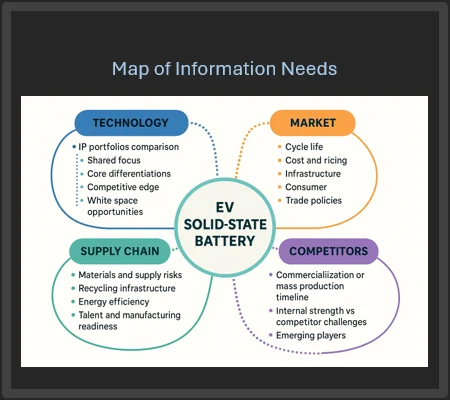
Match your information needs to the right source
Analysis and synthesize information from industry and market reports, company filings, and existing literature is crucial but often might not be enough. Patent analytics are an unique source you can leverage to address specific parts of your information needs, in particular:
Benchmark competitors’ technology strength, including key shared tech areas; core differentiators; white space/opportunities; R&D investment strategies; market intentions; etc.
Map emerging players, and potential partner opportunities
Step 2. Conduct patent analytics to help fill your information needs
PatentSight enables you to rapidly compile customized datasets using advanced search filters. Upon initiating a search, the platform automatically generates a workbook containing visual analytical outputs in tabular and chart formats that help users generate insights and explore deeper, more granular analysis.
PatentSight provides two search options, Custom Analysis and Playbooks:
Playbook (recommended for first-time users)
There are more than 10 playbook templates available in the database. For the Hyundai case scenario, the best playbook to use is “Benchmarking.”
Select Playbook: Benchmarking
Change IPC (patent classification) search to H01M (See detailed instruction on IPC searching)
Add Owner search: Hyundai, Honda, Nissan, Toyota
Select Full-text and type
solid state or solid-state or solid electrolyte
Select <Search Results>
Evaluate the resulting dataset for accuracy based on your existing knowledge. Adjust search as needed.
Select Options > Apply current search to all worksheets By performing this action, the database applies your search strategy to generate templated tables and charts.
Edit, delete, or add analysis templates to the playbook as desired.
Click the "Generate Insight" button at the bottom right of each table or chart for an AI-powered summary or explore insights on your own.
Custom Analysis (self-designed search)
Select Custom Analysis
Select Owner icon in the left column, add Hyundai, Honda, Nissan, Toyota
Combine with patent classification search: select IPC icon, select IPC code: H01M
Select Full-text and type
solid state or solid-state or solid electrolyte
Select Search Results button
Evaluate the resulting dataset for accuracy based on your existing knowledge. Adjust search as needed
Select the arrow sign to open Analysis Template panel
Select ready-to-use template, the database will provide you the visualized analytical result
Click the "Generate Insight" button at the bottom right of each table or chart for an AI-powered summary, or explore insights on your own
Tip:
Always save your work manually through Workbook > Save to ensure changes are retained, even though the system auto-saves during use.
Use the Help > Knowledge Base for quick search instruction or email infoservices@hbs.edu for assistance.
Example search strategy and workbook: Benchmark Hyundai competitors' tech strength
Step 3. Synthesize your findings into insights
The table below demonstrates how you may organize your insights.